
The Challenge
On Black Friday (two days ago from the time of this post), I saw that namecheap was offering sizeable discounts on domain registration and hosting. I decided to register the domain of healthcareforchange.org, for the non-profit organization my wife and I decided to start. I decided it would be an interesting challenge to see just how easy and affordable it is these days to create a website, host it, ensure it’s secure, and also be able to access a custom email on that domain. I might have put the cart before the horse, considering my background is in data engineering and operations, not web development and infrastructure, and a lot of what I learned regarding development was basic html, css, and javascript classes that are probably out of date with how things are done now (and probably were even then). I thought it would be interesting to document the rabbit hole I went down discovering solutions to these challenges.
Domain Registration
I’ve heard for a while from others that namecheap is the de facto way to go for most domain registration these days. Since they had a Black Friday deal, I decided to bite. It was about 6 dollars USD to get the healthcareforchange.org domain. There was not a lot of decision making for this step.
Website Design
First, I decided that I wanted a static website, mainly for explaining the organization’s mission, projects, and events. A dynamic website would be overkill, and harder to secure with my more limited knowledge. I’d built a few streamlit applications, but that was about it.
Next, I started researching frameworks that were easy to pick up and searching the internet, I considered using Pelican, based on Python, my language of choice, but it didn’t seem too popular and probably didn’t have a lot of support. A lot of people were suggesting Jekyll, a static site generator built with Ruby. I have no Ruby experience, but it seemed like mainly you would be editing yaml and markdown files, something I have a lot of experience with. This blog is being written in markdown, which I love. I found an open source template and started editing it to my needs. It didn’t take long to create a passably professional-looking website.
After building a site with Jekyll and getting it hosted, which took about a day I actually learned about Hugo, which is written in Go. Like Jekyll, you aren’t dealing with that much actual Go, but mainly editing yaml (or toml) and markdown files. Still, given I didn’t really know either, I am more willing to learn Go than Ruby. Another factor in preferring Go was hosting, which I will come to next. I decided to leave the healthcareforchange in Jekyll for now, but I choose Hugo for my personal website. I don’t think that decision is very consequential. If you are not primarily a web developer but want to build something simple yourself, either one works pretty well.
Hosting
I had a few options to choose from here. I could either self host on my NAS at home, or I could find a cloud solution. I was intrigued with the idea of self hosting as a learning experience, and had ported some containerized web applications out in the past on a small scale, but generally I am wary of exposing any ports on my local network to the internet, and usually I avoid it by using Tailscale to create a mesh VPN when I am outside of my local network. I did create containers for a Jekyll environment and Nginix Proxy Manager, and the process of porting the site out was not difficult, but in terms of security and avilability, my homelab options were probably more of a headache than I wanted to deal with.
I did also buy webhosting from namecheap, but I found the service and UI a little unintuitive and hard to use, and I would have to keep renewing it every year. I wanted to see if there were other cloud options that would be free for the forseeable future. I’d already changed the Domain’s nameservers from namecheap’s to CloudFlare, so it was already less integrated than it was supposed to be.
The first option I saw was Github Pages, which allows you to host static sites for free. They have the convention of https://example.github.io, but they can integrate with a custom domain through DNS. Any changes to the github repository that the site is based off of will automatically publish the changes to the site. It also seemed to be highly integrated with Jekyll (though you can choose other frameworks, or none) which was a big push for me towards choosing Jekyll at first. After some technical issues that took an afternoon to figure out, I managed to get the github site up, and pointed custom domain to the site via CNAME. I considered that a big accomplishment.
Later, I learned that Cloudflare itself has Cloudflare Pages for static websites, also for free. It integrates with Github repositories, and there a huge number of frameworks to choose from:
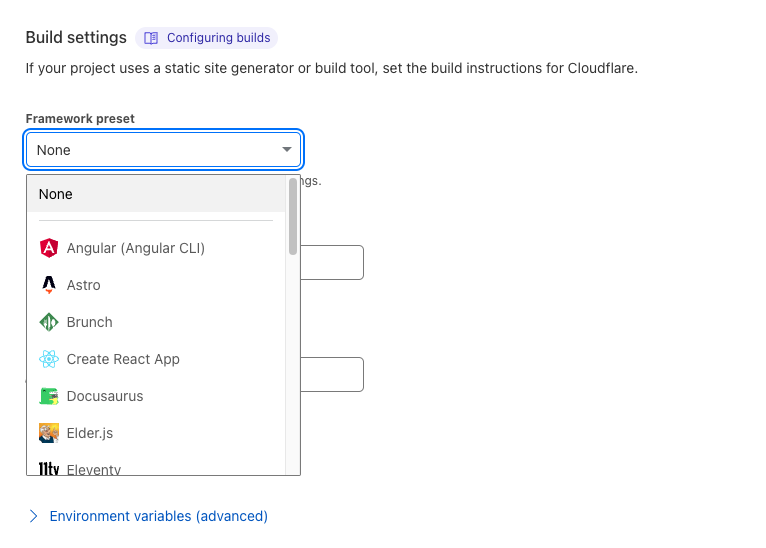
Another difference is that Github Pages requires you to build the site from a public repository, whereas with Cloudflare, it can be public or private, if you don’t want the source code public for whatever reason. Having learned all this, I decided to host my personal site on Cloudflare pages using Hugo, and to later rebuild the healthcareforchange site with Hugo and also change it to Cloudflare Pages.
Getting a free email service for my needs was more challenging than I thought it would be. The first service I tried using was Zoho Mail, which has a free tier. However, it does not allow stmp, imap, pop or the automatic forwarding of mail to another email address. I don’t think I would regularly sign into zoho to check mail, and didn’t want to download another app on my phone just for checking it.
I tried actually setting up my own email server on my NAS, but I found out that many ISPs, including mine restrict port 25 on home internet, so I could not send out emails through the server.
Finally, I saw that the cheapest tier on iCloud+, which is 99 cents, included being able to use your custom domain, and you could send and recieve emails from it with a preferred email client. It’s not free, but I suppose 99 cents a month, which includes a lot of the other features of iCloud+ is a relatively simple way to get mails delivered to the right inbox.
Since then, I have heard that mailgun could also be used to do this for free, but I think icloud is a good enough solution and many people probably already at least subscribe to the first tier, if not a higher one.
Verdict
So, I would say going almost from scratch, it really is not difficult or expensive to get a small/personal website off the ground. Solutions that worked for me are:
- Registration: Namecheap ($6.16 from a Black Friday sale. Probably around 15 dollars a year to renew after that)
- Web Framework: Hugo (Free)
- DNS Services: Cloudflare (Free)
- Hosting: Cloudflare Pages (Free)
- Email: iCloud+ (99 cents a month)
After a bit of a learning curve, a lot of things fall into place. This of course, is probably not the same set of solutions for a dynamic website that can be hit with high demands, though a lot of these services can probably be scaled to meet it. Overall, figuring this stuff out was an interesting learning opportunity to fall into during a Thanksgiving Break.